
Tools & step-by-step guides
How to Use the State Disclaimer Lookup for Cottage Food Labels
Find a starting point for cottage food label wording with The Label Lady’s 50-state lookup. Follow Jess’s screenshot walkthrough and check the official source before printing.
What sentence belongs on a cottage food label? That question can send you through a lot of search results before you reach the rule that applies to your business.
I built The Label Lady’s State Disclaimer Lookup to make that first step easier. Choose your state to see its stored home-production wording or requirement summary, program notes, and a reference link. The lookup has entries for all 50 states and shows an October 27, 2026 update date.
Open the State Disclaimer Lookup →
Before you print: this is a research starting point, not a complete label review. Check the current official source and confirm that the rule applies to your product, permit or program, and sales channel.
1. Open the label workspace
Go to the Label Tools page. Scroll to Your label workspace, then click State Disclaimer Lookup. You’ll see a State dropdown on the left and a result area on the right.
2. Choose your state
Select the state where you operate. The result updates automatically; there is no separate search button. To check a different state, choose it from the same dropdown.
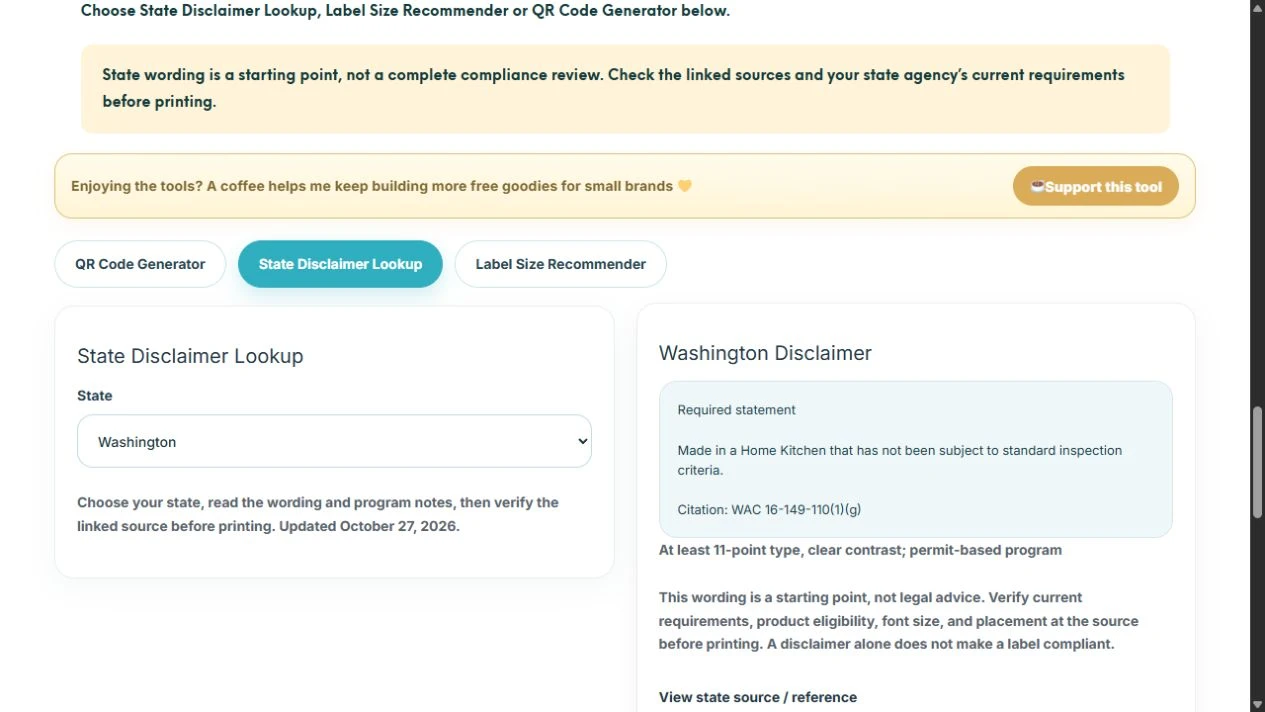
3. Read the wording and the notes together
Look at the kind of answer shown. An entry may give a required statement, summarize information you must include, or explain a permit or inspection program. A summary is not necessarily an exact sentence to copy.
In the Washington example, the tool shows a required home-kitchen statement and notes at least 11-point type, clear contrast, and a permit-based program. That example illustrates why the small notes matter: wording alone does not tell you everything about how a label must be prepared.
If an entry describes more than one program, flags uncertainty, or mentions a change in the law, confirm which rule applies before using the text. An entry with no fixed home-production sentence does not mean that your label needs no other information.
4. Open the source before using the text
Click View state source / reference below the result. Check the official requirement, including the applicable program, wording, type size, and placement. If the reference is unclear or out of date, contact the state agency before ordering labels.
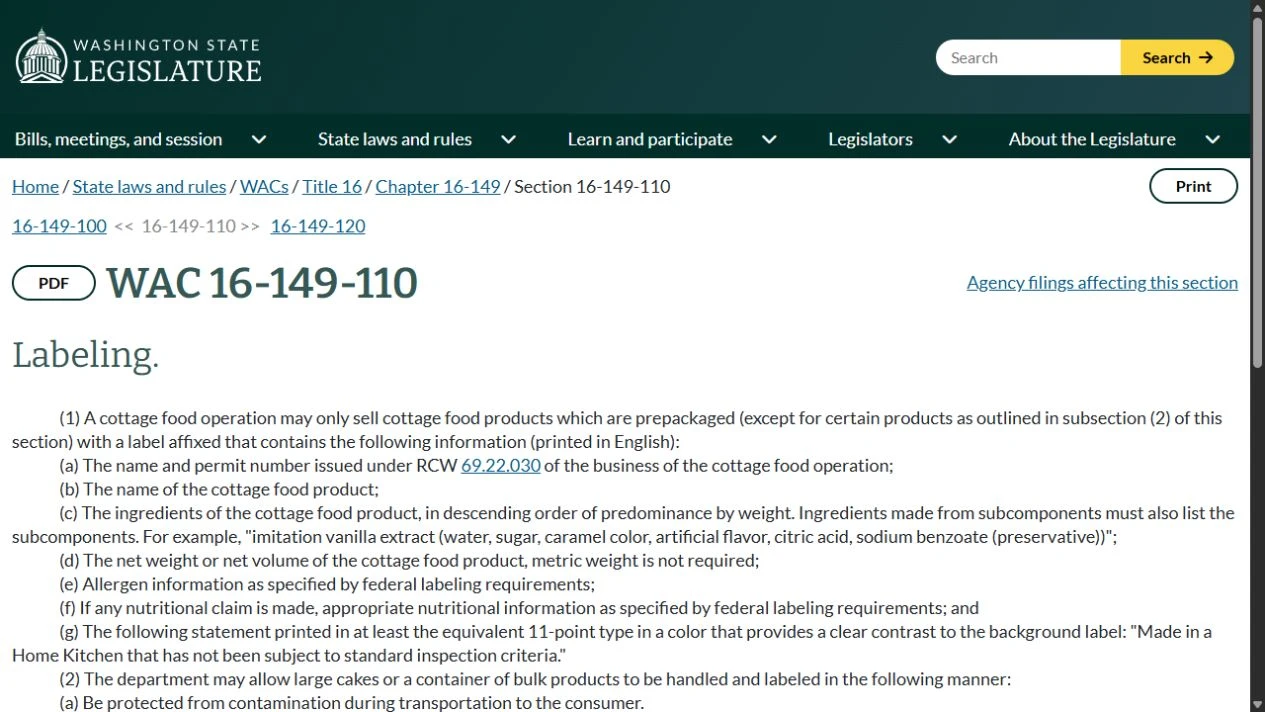
For this example, Washington’s WAC 16-149-110 also covers business identification, the product name, ingredients, net quantity, allergens, and nutrition information when a nutritional claim is made. This is why checking only the home-production statement is not a complete compliance review.
5. Bring the confirmed wording into your label project
Once you have checked the requirement, copy the applicable wording into your label artwork or send the official reference along with your design request. Include any required formatting instructions. Keep your product details and ingredient information separate so nothing gets overlooked.
Then use the Label Size Recommender in the same workspace to explore a starting size. Measure the usable area of your actual package and test a paper sample. The recommendation helps with fit; it does not decide whether your legal information is complete or readable.
Before you order
- Confirm the rule applies to your food and your operation.
- Check the full label requirements, not just the disclaimer.
- Check text size, contrast, and placement on the final artwork.
- Read a proof at the actual printed size.
- Recheck requirements when your product, program, or sales channel changes.
Ready to turn your artwork into printed labels? Get a custom roll-label quote, or ask Jess for help with your label layout. Bring your confirmed wording and reference so we can plan the space around it.
Need help with the next step? Follow my label sizing and quote walkthrough.